Format your resume professionally to make a great impression.
For the hiring managers, HR staff, and recruiters who read sometimes hundreds of resumes a day, resume formatting is a frequent source of frustration: applicants use too many different fonts, make punctuation errors, leave inconsistent and messy spacing, etc.
How can you make sure reviewers who see your resume want to keep reading? Your resume should be easy to read, emphasize the most important information, and leave a positive impression of you, the applicant.
Follow these detailed tips to format your resume like an expert:
There are three basic resume styles, or formats: chronological, functional, and combination. Choose the style that will best feature your work experience and skills.
- A chronological format emphasizes your work history. It’s a good choice for those who have a solid work history and are staying in the same field. See chronological resume sample.
- A functional format emphasizes skills and experience, with little detail on work history. However, without a detailed work history, the resume may be misinterpreted by employers, or rejected by applicant tracking systems (ATS), used by many employers to screen applications. See functional resume sample.
- A combination format works well for most people. The combination style includes a summary section at the top, may also have a skills section, but also includes a detailed work history. This format works well to highlight transferable skills from paid and unpaid work, refocus your experience for a career change, or minimize work gaps. See combination resume sample.
Your resume layout should be clean and consistent. Since ATS systems scan resumes left to right, start with a simple, single-column layout so your resume is read accurately.
- Resume length should be 1-2 pages. Only use 2 pages if necessary due to your amount of experience.
- Use standard section headings like "Work Experience," "Education," and "Skills" so both human readers and ATS can quickly find information.
- Use the same amount of space before and after headings, between bullets, etc. for a clean, uniform look. Use 1-inch margins to allow for white space.
- Avoid using tables, text boxes, logos, columns, images, and graphics, as ATS may scramble the content.
- Avoid putting important information in the header or footer, since some ATS systems cannot read text placed inside these.
- Lines and borders may be used as long as they do not touch any text.
Your font choice makes a big impact on the readability of your resume. Use standard, professional fonts for the best results.
- If a font is not specified, use a basic font such as Calibri, Arial, Georgia, Garamond, or Times New Roman, with font size of 10 -12. Do not use extra spaces or special characters in your name.
- The font used for section headings can be a few points larger than other text.
- Use only one font throughout the resume, or choose a second font to use only for headings. More than that is distracting.
- The use of bold or all capital letters is fine but avoid or minimize the use of italics and underline. Keep your use of bold consistent and only for points of emphasis, such as your name, section headings, job title, and degree/credentials.
- Putting extra keywords in a white font on your resume will not "trick" an ATS.
- For dates, use the standard format MM/DD/YYYY or Month, YYYY; avoid abbreviations, such as ’19.
- Include the exact dates you began and ended each job, or number of years you used a particular skill, even if you must estimate it. An ATS may assign you a "default" time, such as 6 months, if you have not specified one.
- Spell out acronyms for readers who are not familiar with your field. For example, “CPA” is fine to use to stand in for “Certified Public Accountant”, but spell out very specific or unfamiliar terms e.g., "Certified Information Systems Auditor (CISA)”.
Using bullets to list details in each section helps to highlight key points and can make complex information easier to read.
- Use only plain black dot bullets, solid circles, open circles, or solid squares. Choose just one style and use it consistently.
- Bars ( | ) may also be used to separate items in a section.
- Avoid using special characters or custom graphics.
Your resume may need to be printed, emailed, or uploaded to a job bank or an employer’s application system. Make sure it looks as you intend it to in any form
- Unless another format is specified, save and send resume as a PDF to preserve the formatting. Use a file name that includes your full name, or full name plus job title such as: Sarah-Smith-Marketing-Coordinator.docx.
- For print resumes, use high quality paper, preferably white, off-white or pale gray.
In the sample resume below, Maya uses a combination format. Because she has a strong work history, she highlights her employment dates. But because she is also seeking to advance to a project coordinator position, she uses skill headings to promote her existing skills that relate to the new job she wants. Each section reinforces her goal to work as a project coordinator.
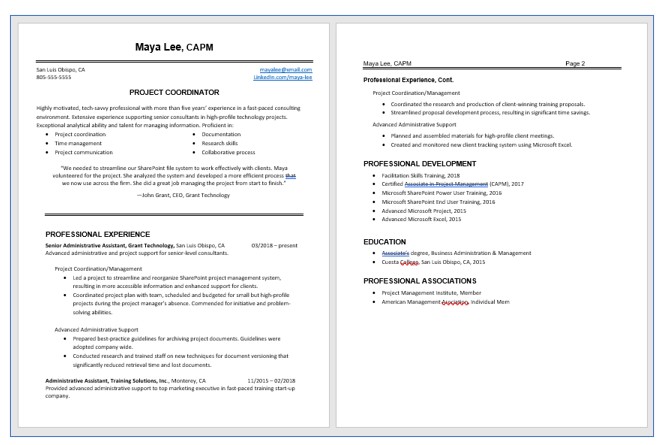
Notice that Maya’s resume is two pages. This gives her room to provide a strong opening, and plenty of white space throughout.
Maya also makes use of bullets and headings to highlight information.